January 2026 Design Challenge: Fire Extinguisher Use for Food Truck Kitchens
Tacomazing Cantina’s food truck fleet serves up delicious tacos prepared in tiny kitchens. Inside Tacomazing trucks, workers cook meats and sides in confined spaces using burners, open top grills, fryers, and other electrical equipment. Just like in a home or restaurant kitchen, fires may start from open flames, hot grease, or equipment malfunctions—posing significant safety risks.
Fire code requires all Tacomazing food trucks to have operational fire extinguishers mounted on board. Fire extinguishers are employees’ first line of defense against a kitchen fire. Cooking fires spread rapidly, so they must be contained quickly to prevent personal injury and truck damage. In the event of a fire, Tacomazing employees must act within seconds to assess its size and severity and put it out with a fire extinguisher.
✅ The Challenge
Tacomazing staff does not receive hands-on practice with fire extinguishers, so they need direct, concise guidance on how to operate them during an emergency.
As an instructional designer for Tacomazing, you’ve been tasked to create a printed, easy-to-reference job aid for posting next to all on-board fire extinguishers.
Job aids truly are the unsung heroes of supporting performance. They provide just-in-time instructions or information to help employees execute a task properly in the moment. If workers have mere seconds to learn to use an extinguisher and fight a small fire, a job aid that is easy to read from a distance with clear directions will help employees pull the pin and take action.
The job aid must direct employees to follow the P.A.S.S. method, a technique that helps end users operate fire extinguishers while combating fires.
📋 Requirements & Constraints
As you plan and design your job aid, keep the following requirements and constraints in mind:
Authoring Tool: For this month’s challenge, choose the graphic design tool of your choice. Remember, the best graphic design tool is the one you’re familiar with! Suggested tools include:
Microsoft PowerPoint
Adobe Illustrator
Adobe InDesign
Canva
Content Presentation: Your 18”x24” job aid should include elements of the Tacomazing style guide to maintain brand standards (colors, fonts, shapes, etc.).
Most importantly, the job aid needs to support employees’ safe operation of a fire extinguisher. Consider incorporating elements such as:
Images and/or icons depicting how to follow each step of the P.A.S.S. method
Accompanying text to explain P.A.S.S. techniques
Text effects (bold words, highlights, etc.) to emphasize critical details
Clear emergency contact information (911) and guidance on when to call for help in the event of a fire
Visual Design: You are free to design the job aid however you’d like; however, it should demonstrate good visual design practices with a cohesive, consistent use of fonts, colors, images, and graphics. We suggest designing the job aid to align with the provided client style guide below. If you’re new to visual design, check out this playlist of videos to help you get started.
🎨 Style Guide
To help in the design of your project, you can view and download the client style guide and brand assets below. You are free to use these to design a branded template or create your own design.
Tacomazing Style Guide.pdfTacomazing Brand Assets.zip📑 Reference Materials
As you design and develop your project, you can create your own content from scratch or source your content from the following references:
🏆 Submission Guidelines & Contest Rules
Once you're done building your project, you can submit it by commenting below and sharing a link to your finished project.
To be eligible to win the $100 Amazon gift card, your submission must be posted no later than Friday, January 30th, at 11:59 PM ET.
You can learn more about the contest rules and criteria here.
If you’d like to get more eyes on your submission and encourage others to participate in the challenges, you might also consider…
Writing a Blog Post: If you happen to have a blog or online portfolio, write a post about your submission and share it on social media. Make sure to link to it in the comments below for others to see!
Record a Video: If you want to share how you went about designing your submission, record and share a screen recording video (via Loom, Camtasia, SnagIt, or YouTube) to showcase and explain your process. And, of course, don't forget to share a link to it in the comments below!
Share on Social Media: If you’re active on LinkedIn or another social media platform, create a post to share your submission. If possible, make sure to link back to this page and tag The eLearning Designer’s Academy on LinkedIn in your post.
💬 Give & Get Feedback
After you've shared your submission, make sure to review what others have submitted and provide constructive feedback. Remember, the monthly challenges (and this community as a whole) are meant to provide an inclusive and supportive environment. As you provide feedback, make sure to keep our Code of Conduct in mind.
As you work to develop your project, also consider sharing your work-in-progress for community feedback in our Get Feedback space here.
🎉 Challenge Recap, Submissions & Winner
For this month’s challenge, we were blown away by the response from the community. With 60 total submissions, this officially became our most popular design challenge to date.
From quick-reference job aids to thoughtfully structured visual systems, it was clear that many of you focused on what matters most in real-world learning: clarity, usability, and decision support in high-stakes moments.
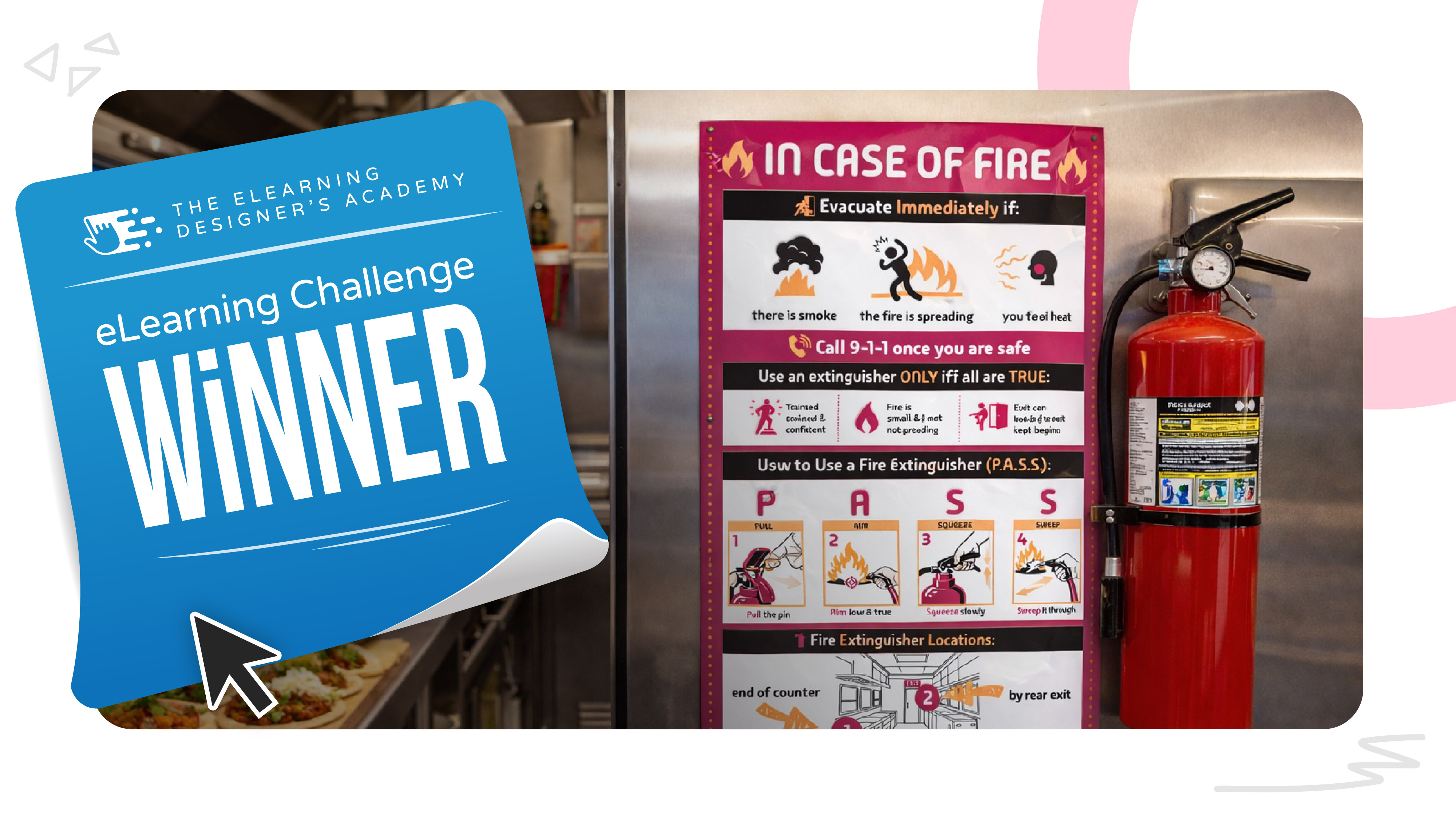
So, congratulations to this month’s design challenge winner:
What stood out most about Sara’s submission was the strong use of iconography, clear visual hierarchy, and restraint. She packed a significant amount of critical information into a single fire extinguisher job aid, without overwhelming the learner.
The result is a clean, scannable resource that feels genuinely usable in the moment it’s needed. This is a great example of how thoughtful visual design and instructional judgment can elevate a simple job aid into an effective performance support tool.
Check out all of the submissions for this month’s challenge (in no particular order):
🙋♂️ New to the Design Challenges?
If you're new to the monthly instructional design and eLearning challenges, check out this post to learn how they work.