What is eLearning?
What is eLearning? What comes to mind when you think of eLearning? And how do you define the different types of eLearning? Do you imagine someone sitting behind a computer clicking a Next button or maybe watching a video on a tablet or mobile device? Perhaps you imagine someone using a virtual reality (VR) headset?
Regardless of what comes to mind, if the learning or training involves a digital device, it’s likely a form of eLearning.
The truth is, not all eLearning is created equally. And if you’re like me, when I first started in the world of instructional design and eLearning development, I used to think the only definition of eLearning was a computer-based course, delivered via a learning management system, which involved slides, a Next button, and the occasional quiz question. And while that type of eLearning describes the eLearning we primarily focus on within workplace learning and development, it’s important that we as learning professionals recognize that the term “eLearning” actually refers to a large and ever-evolving catalog of digital learning modalities.
So, in this article, I’ll provide my definition of eLearning, explain the different types and characteristics of eLearning, and explore the benefits of eLearning. We’ll also take a high-level look at how eLearning is designed and developed, what types of elements you typically see in an asynchronous, interactive eLearning course, and what various eLearning authoring tools you might use to create eLearning. And finally, we’ll take a look at some eLearning examples.
Table of Contents
Free Course: 10-Day Career Mindset Reset
Inside The eLearning Designer’s Academy, we think a little differently about professional development and career growth. Enroll in our free 10-Day Career Mindset Reset to start thinking differently about your skills, career, and confidence!
So, What is eLearning?
Well, providing a single definition of eLearning isn’t easy. While you might think of eLearning as an online, slide-based course with a Next button, the truth is that this is only one example of eLearning. Because the technology we use to access information is always evolving, there are continually new examples of how it is being used to deliver learning content.
With that said, I define eLearning as any training experience that takes place on a digital device such as a computer, a tablet, a smartphone, or some other device.
Now, while this definition of eLearning might seem broad, it really makes the most sense when you consider all of the various ways content and training can be delivered digitally. For example, if you learn something by watching a YouTube video, that’s an example of eLearning! If you see content on TikTok that teaches you something new, that’s an example of eLearning! If you complete an online course through a university, that’s an example of eLearning! And if you attend a live webinar, that’s also an example of eLearning!
And so, I don’t mean to be cliché, but my point is the possibilities for what eLearning is and what it can be are literally endless!
Types of eLearning
So, now that we have a common definition for what eLearning is, the next question we need to ask and answer is: If there are so many different kinds of eLearning, do they share any common characteristics? Well, I’m glad you asked! Because the answer is yes!
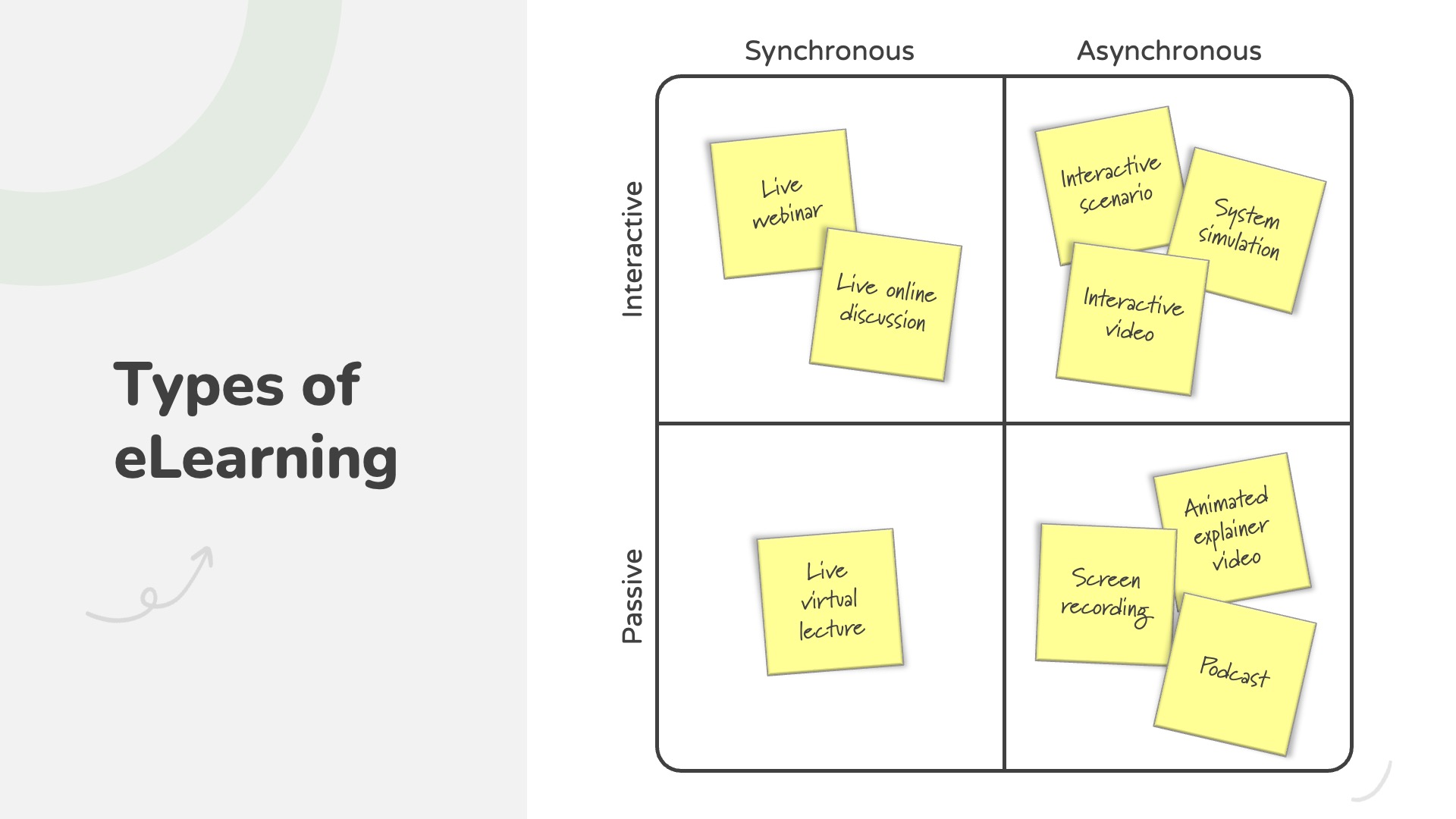
While the “umbrella” of eLearning is always evolving and growing, there are a few common characteristics you can use to categorize the different types of eLearning. I like to view it as a simple matrix.
Asynchronous vs. Synchronous eLearning
For starters, eLearning can be asynchronous or synchronous.
Asynchronous eLearning is the most commonly used and thought of when we imagine a typical eLearning course: A self-paced, interactive course created in a tool like Articulate Storyline, Rise, or another eLearning authoring tool and delivered via a learning management system (LMS). With asynchronous eLearning, learners complete the training on their own with no set time for when the learning takes place. Examples of asynchronous eLearning include videos, interactive online courses, or ongoing discussion boards.
Next, we have synchronous eLearning. And this type of eLearning isn’t as frequently referenced as “eLearning” per se but rather is virtual instructor-led training (vILT). Most instructor-led training is synchronous, which means all the learners are engaged in the learning event at the same time (such as in a classroom). However, there are also several examples of eLearning that are synchronous as well.
For example, a live webinar or a live online discussion are both forms of synchronous eLearning. And while you could also argue those are examples of virtual instructor-led training, this a great example of where different terms and modalities intersect with one another.
Interactive vs. Passive eLearning
Next, eLearning can either be interactive or passive.
Because eLearning uses technology to deliver the learning content, interactivity is often used to enhance the learning experience. For example, the learner is given control over the navigation of a course with a menu or some other navigation buttons. Some eLearning courses might use quiz questions to test the learners’ knowledge or branching scenarios where the learner makes a decision and sees—and hopefully learns from—the result of that decision. These are all examples of interactive eLearning.
And finally, we have passive eLearning. Whether it’s a video, an online article, a digital infographic, or something else, any digital learning content that doesn’t require the learner to interact with it in some meaningful way can be considered passive eLearning.
What are the Benefits of eLearning?
So, now that we know that eLearning can be asynchronous or synchronous and interactive or passive, let’s now explore some of the benefits eLearning has to offer.
In the world of learning and development, instructor-led training (whether it’s delivered in-person or virtually) is still very popular and used every single day; however, eLearning offers a ton of benefits that just can’t be matched by other training modalities. And it’s because of this that more and more organizations have been turning to eLearning in the hopes of taking advantage of these benefits.
Now, when it comes down to it, the primary benefit of eLearning is simple: eLearning can be created once and delivered multiple times to multiple learners in multiple locations.
And it’s this that really sets eLearning apart from everything else. But let’s look a little deeper into some of the benefits eLearning has to offer:
First, eLearning can be distributed globally: Because eLearning is delivered on a computer or some other internet-connected device, eLearning can be easily delivered to a large population of learners (regardless of their location).
Second, eLearning is available when the learner needs it: Because most eLearning doesn’t require an instructor, learners can access the learning content when they need it the most, whether it’s when they’re on the job or in any situation.
Third, eLearning can offer a consistent learning experience and message: Because an eLearning course can be created once and delivered to multiple learners, eLearning can ensure that each learner receives the same learning experience and content. And this is especially important when you’re creating training that has to comply with certain regulations or laws.
Fourth, eLearning can track learner progress: Because eLearning is usually delivered through a hosting platform, like a learning management system or LMS, most eLearning can track and report on the progress of each individual learner.
Fifth and finally, eLearning can save time and money: Because eLearning can be created once and delivered multiple times to multiple learners in multiple locations, it can save time and money, especially when you compare it to traditional instructor-led training. This is particularly true when you consider potential travel costs, etc. This not only makes eLearning cost-effective but also more environmentally friendly.
How is eLearning Created?
Alright! So, if eLearning has all of these benefits that it can offer, the next question is: How is eLearning created? The truth is, the answer to this question is contextual (depending on the type of eLearning you’re creating). But, for the purposes of this article, we’re going to focus on the most common type: Asynchronous, interactive eLearning.
Now, before we dive into how eLearning is created, I’d be remiss if I didn’t provide context as to where eLearning development fits into the whole instructional design process. And the best way to do that is to put the eLearning development process in the context of the ADDIE model.
The ADDIE model of instructional design is the most widely known and used instructional design and development model in our industry and consists of five phases: Analysis, design, development, implementation, and evaluation.
Analysis & Design
To kick things off, the instructional designer or eLearning developer conducts a needs analysis to determine the root cause of a performance issue and validate that training is the solution. From there, they’d then work to design a blended training solution and draft a design document to propose that solution back to their stakeholders and subject matter experts. And these two steps would account for the Analysis and Design phases of the ADDIE model.
Development
From this point, the instructional designer or eLearning developer would move into the Development phase, where they’d start building the training objects proposed in their design document. And assuming an eLearning course was included as a solution to be created, this is where the eLearning development process would kick in.
The design and development of an eLearning course is a bit more complex than other types of training content. Because eLearning is a form of digital, interactive multimedia, the process of creating an eLearning course can be a bit more time-consuming. Unlike instructor-led training, where the facilitator might have some presentation slides, handouts, activities, and bullet points for what they want to say, the design and development of eLearning requires scripting, planning, and creating every aspect of what the learner will see. In other words, eLearning requires much more upfront planning.
For example, in a classroom, a facilitator can adjust and pivot the training experience in real time, depending on the learners’ needs or questions. However, with eLearning, the designer and developer must anticipate all of the learners’ needs ahead of time and build them into the training content and experience.
With that context in mind, the eLearning development process consists of three main steps:
Collect & Organize Content into an eLearning Outline: Working with one or more subject matter experts, the instructional designer or eLearning developer would collect all of the course content, sort through it, and create an outline of the eLearning course. An outline is like a high-level map that visualizes how the course content will be structured and how the learner will flow from one topic to another.
Draft an eLearning Storyboard: From there, the instructional designer or eLearning developer would use the outline to draft an eLearning storyboard. An eLearning storyboard is similar to a blueprint for a house, outlining slide-by-slide or screen-by-screen all of the course content that will be presented to the learner (including audio narration, on-screen text, graphics, interactivity, animations, etc.).
Develop a Prototype: After creating a storyboard, the instructional designer or eLearning developer would then use one or more authoring tools to develop a prototype. While prototypes come in many different formats, most prototypes help establish the look and feel of the course (including fonts, colors, images, and different layouts). The prototype is also where any interactivity starts getting built into the course.
Implementation & Evaluation
And finally, after an eLearning course is designed and developed, an instructional designer would move into the Implementation and Evaluation phases of the ADDIE model.
In terms of implementation, most interactive and asynchronous eLearning is implemented and delivered via a learning management system. A learning management system allows an organization to assign and distribute the eLearning course to multiple learners. And as each learner completes the course, the LMS can track their progress, including completion rates, quiz scores, etc.
After the eLearning course is implemented (along with any other training objects that were created and delivered), the training is usually evaluated and measured for effectiveness. Most organizations follow Kirkpatrick’s Four Levels of Evaluation to measure learner satisfaction, learner knowledge, learner skill, and business results.
What Tools are Used to Design & Develop eLearning?
Just like the eLearning development process will vary depending on the type of eLearning being created, the same is true for what eLearning authoring tools you might use to create eLearning. Instructional designers and eLearning developers use a variety of tools that fall into various categories.
SCORM-Compliant eLearning Authoring Tools
Because most eLearning is delivered via a learning management system, the most popular and widely used eLearning authoring tools are those that are SCORM-compliant. And to put it simply, SCORM is the “language” used between an eLearning course and LMS to communicate learner progress and tracking.
The most popular SCORM-compliant eLearning authoring tools include:
Articulate Storyline is a desktop authoring tool that allows you to create slide-based eLearning courses that include images, text, animations, video, interactions, and much more.
Rise is a web-based eLearning authoring tool created by Articulate which allows you to create text-based, mobile responsive eLearning courses with various forms of images, video, and other multimedia.
Adobe Captivate is the main competitor tool offered by Adobe that lets you create responsive eLearning courses (similar to Rise) while allowing for more customization like Articulate Storyline.
iSpring is a PowerPoint-based plugin that allows you to design and develop slides in PowerPoint and then convert them into interactive eLearning courses.
Lectora is a desktop and web-based authoring tool that lets you create Section 508 and WCAG courses optimized for accessibility.
Video Editing Tools
While the SCORM-compliant eLearning authoring tools are usually the primary tool for developing eLearning, many instructional designers and eLearning developers also use various tools to create and edit video content. These videos can either act as a standalone training object or be integrated as a piece of multimedia into one of the tools listed previously.
The most commonly used video editing tools include:
Camtasia is a video editing tool created by TechSmith, the creator of Snagit. While Camtasia is mostly known for its screen recording abilities, Camtasia can be used to create and edit all types of video content, from talking-head videos to animated explainer videos, etc. In fact, Camtasia is the tool I use to create and edit all of my YouTube videos.
Vyond is a web-based video creation tool which lets you create animated explainer videos drawing from a library of premade graphic assets. Unlike other complex tools where you have to source and create your own graphics, Vyond is an ideal tool for those new to using videos for visual communications and animation.
Synthesia is a web-based tool that lets you generate talking head videos using AI. With Synthesia, you can copy and paste a script from a storyboard, pick a character, and select a background. The tool will create a video with a semi-realistic avatar.
Adobe Premiere is an advanced video editing tool. While Adobe Premiere can be used to edit all types of videos, it is typically used to edit high-end, professional-grade projects.
Adobe After Effects is also a motion graphics and animation tool. Like Adobe Premiere, Adobe After Effects is an advanced tool used to create complex, professional-grade animated content.
Graphic Design Tools
Outside of the main tools used to author interactive eLearning content or video-based content, instructional designers and eLearning developers also use a wide variety of graphic design tools to create and edit different images and graphic assets for their eLearning courses.
The most commonly used graphic design tools include:
PowerPoint is a slide-based presentation design tool. And while PowerPoint is commonly used for creating slide decks for presentations, instructor-led workshops, and other events, it is also commonly used as a basic graphic design and photo editing tool.
Canva is a web-based, multi-purpose graphic design tool used for creating presentations, social media assets, and other design elements. Canva is often used to source design elements and assets, which can be used as part of an eLearning course.
Adobe Illustrator is a graphic design tool primarily used for creating and editing vector graphics. While mainly used by professional graphic designers and other visual artists, Adobe Illustrator is used by instructional designers and eLearning developers for creating high-quality visual elements for eLearning courses.
Adobe Photoshop is a professional photo editing tool used to edit photographic images. Photoshop is often used to touch up and enhance real-life images, remove backgrounds, etc.
Snagit is a simple screenshot and recording tool used to capture and edit images. While primarily used as a tool to enhance communications or create job aids, Snagit is often used to capture and edit images for eLearning.
Audio Tools
In addition to creating and editing graphic assets, instructional designers and eLearning developers also use different tools to record, edit, and generate audio narration for their eLearning courses.
The most commonly used audio tools include:
Audacity is a free tool used to record, edit, and enhance audio narration.
Camtasia is primarily a video editing tool; however, it is also used for recording and editing audio content.
WellSaid Labs is a web-based tool which lets you generate spoken audio narration using AI. With WellSaid Labs, you can copy and paste a script, select an avatar, and generate audio clips.
What are the Components of an eLearning Course?
Because eLearning can come in so many different formats and be created with so many different types of tools (as you’ll see in the eLearning examples below), the components or elements that can make up an eLearning course can be as equally diverse.
However, most asynchronous, interactive eLearning usually contains a combination of on-screen text, graphics, animations, and various types of interactivity.
Content Presentation
Depending on the eLearning authoring tool being used and the instructional strategies of the course, there are many different methods an instructional designer and eLearning developer may use to present the training content to the learner.

Methods for eLearning content presentation usually include:
On-Screen Text: Most eLearning usually includes some type of on-screen text to communicate the training content or to emphasize the main points of what’s being taught.
Images & Graphics: Because eLearning is a form of digital multimedia, images and graphics are often used to help visualize the training content. This can include anything from static images to technical drawings, charts, tables, characters, icons, etc.
Videos & Animations: Similar to images and graphics, videos and animations can be used to visualize the training content or provide a richer multimedia experience. This can include talking head videos, screen recordings, animated explainer videos, etc.
Audio Narration: To help supplement on-screen text and images, audio narration is often used to help deliver and explain training content. Most eLearning courses that include audio narration also use animations to help visualize and bring the concepts to life.
Interactivity
Depending on your learning objectives, interactivity plays an important role when designing and developing eLearning that’s focused on performance, as it lets you create experiences where learners put skills into practice. However, interactivity can also be used for other purposes, including course navigation, etc.
Methods for eLearning interactivity usually include:
Learner Navigation: Most interactive eLearning authoring tools include some sort of player, menu, or navigational controls (i.e., Next and Previous buttons) to let learners explore the course content.
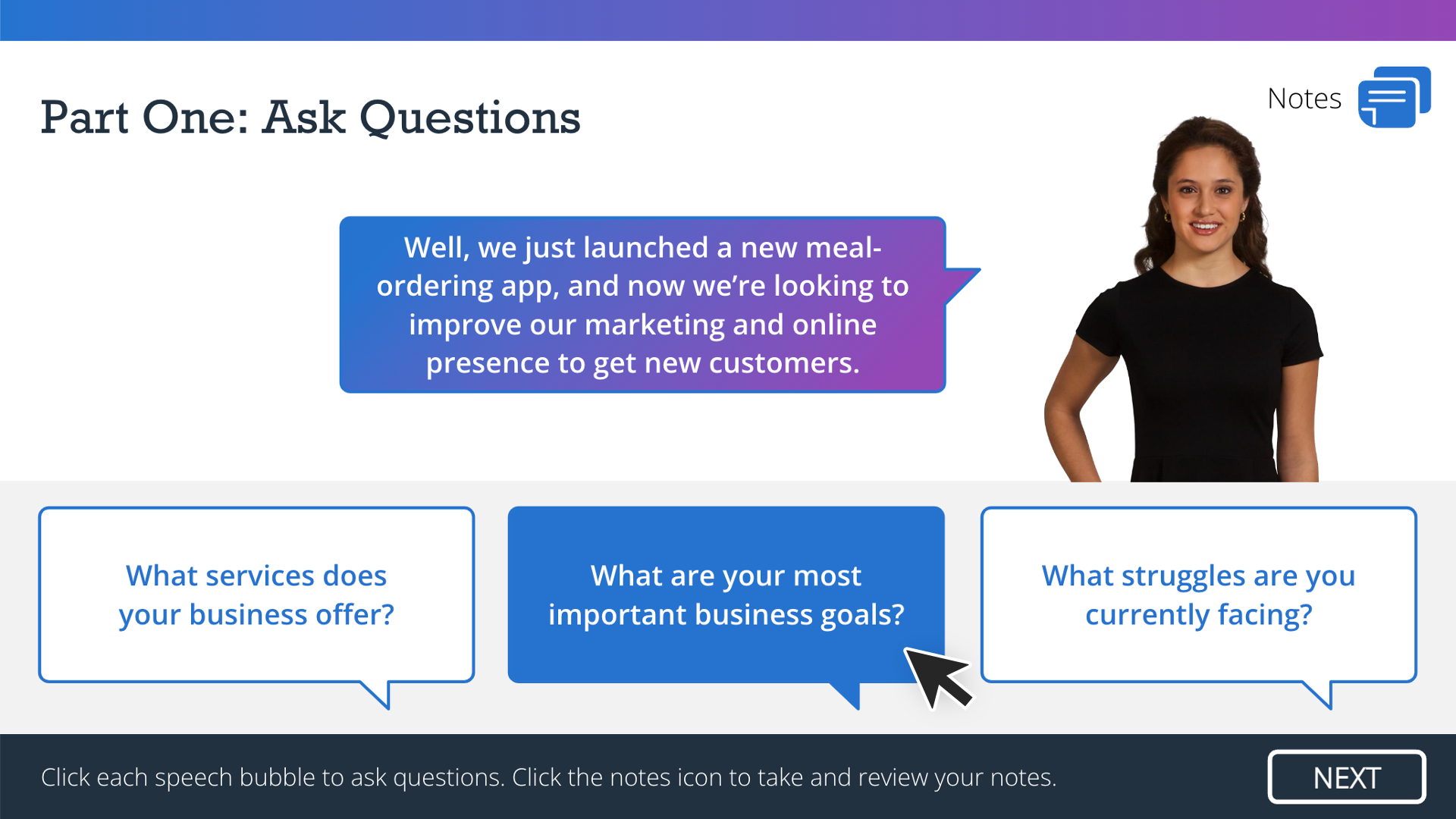
Click-to-Reveal Interactions: Considered a simple / passive form of interactivity, click-to-reveal interactions involve the learner clicking a button or other interactive object to reveal additional content. Whether it’s a tabbed interaction, a timeline interaction, or something else, click-to-reveal interactions can be used to consolidate content or organize it in a meaningful way.
Decision-Based Interactions: Considered an active / advanced form of interactivity, decision- or performance-based interactions ask the learner to apply what they’ve been taught to make a decision. Usually delivered in the form of a branching scenario, decision-based interactions typically include various forms of feedback and outcomes, depending on the learner’s selections.
System Simulations: When teaching how to use an application or piece of software, a system simulation is often created to provide learners with a realistic replica of a particular workflow or process.
Knowledge Checks & Assessments: Used to test learner knowledge, quiz questions, and assessments are often incorporated into eLearning as part of a larger strategy to evaluate the effectiveness of the training.
What Makes Effective eLearning?
Because of the benefits it has to offer, eLearning is often used as a modality for many different training situations. But what makes effective eLearning?
The truth is, while it’s easy to say that the only thing needed to make a “good” or “effective” eLearning course is good instructional design, the effectiveness of an eLearning course is also dependent on how it’s designed and how the various elements we just explored work together to create a complete experience.
Graphic Design: Because eLearning is a form of mixed multimedia, an effective eLearning course should demonstrate good graphic design techniques. This includes using consistent fonts, colors, images, and layouts to create an aesthetically pleasing and accessible experience.
Visual Communication: Because eLearning allows for images, graphics, and animations to communicate the training content, whenever possible, visual communication should be used to help learners “see” the concepts being explained.
User Interface Design: Because eLearning allows for interactivity, the buttons and other interactive elements should be intuitive, consistent, easy to navigate, and accessible.
Instructional Design: Because eLearning is one of many different modalities for creating learning, good instructional design theories and best practices should be applied to create engaging and effective experiences. This means designing eLearning that’s focused on what people need to do rather than what they need to know. And this is accomplished by designing performance-based interactions like branching scenarios, etc.
eLearning Examples
Alright! So, now that we’ve explored the different types of eLearning, how eLearning is designed and developed, the different tools and elements used to create eLearning, and what makes effective eLearning, it’s a good time to start looking at some examples.
Exploring various eLearning examples is the best way to learn and understand all the different ways eLearning can be used to create engaging and interactive training experiences.
Check out our eLearning Examples space to view various projects created by those in the community.
The Bottom Line
Gosh! Who knew there was so much to say about eLearning?! Yes, it’s easy to view eLearning simply as a series of slides with a Next button; however, eLearning is and can be so much more than that. Once you expand your definition of eLearning, consider all of the different tools used to create eLearning, and think about all of the elements included in eLearning, it becomes clear how diverse and powerful eLearning can be as part of any instructional design and training strategy.
Whether you’re a new instructional designer or eLearning developer (or you already have some experience under your belt), understanding what eLearning is, how it’s created, and what makes effective eLearning can set you on the right path for creating your own eLearning content.
So, what do you think? How do you define eLearning? What do you think makes good eLearning? What other tools do you use to create eLearning? And what else would you add about how eLearning is designed and developed? Share your thoughts, tips, and questions by commenting below!
Frequently Asked Questions About eLearning
How can organizations ensure the effectiveness of their eLearning programs?
Organizations can ensure their eLearning programs are effective by setting clear learning objectives, designing engaging and interactive content, regularly assessing learner progress, and gathering feedback for continuous improvement and iteration.
What is the typical duration of an eLearning course?
The length of an eLearning course can vary widely depending on the topic and audience. However, it’s often recommended to keep modules concise—ideally between 10 and 15 minutes—to maintain engagement and accommodate learners’ busy schedules.
How long does it take to develop an eLearning course?
The time it takes to develop an eLearning course depends on the level of interactivity, multimedia, and complexity involved. A simple course might take a few weeks to design and build, while more complex, highly interactive courses can take several months from start to finish. On average, instructional designers estimate 40–120 hours of development time per finished hour of eLearning content.
Do I need coding skills to develop eLearning?
No, you typically do not need coding skills to develop eLearning. Most modern authoring tools like Articulate Storyline and Rise are designed to be used without programming knowledge. However, having basic HTML, CSS, or JavaScript skills can be helpful for customizing projects later on.
How do I choose the right eLearning authoring tool?
Choosing the right tool depends on the type of eLearning you want to create, your technical skills, and your budget. Tools like Rise 360 are ideal for quick, mobile-responsive courses, while Storyline 360 offers more customization and interactivity. Many new practitioners start with one or both, as they are widely used across industries.
What’s the difference between an instructional designer and an eLearning developer?
Instructional designers focus on analyzing learning needs, designing learning experiences, and writing content. eLearning developers are more focused on building the actual digital course using authoring tools. In some roles, especially in smaller organizations, one person may handle both responsibilities.